

MCP server overview
<p align=“center”>English | <a href=“README.zh-cn.md”>中文</a><br></p>
alibabacloud-devops-mcp-server
AlibabaCloud Devops MCP Server provides AI assistants with the ability to interact with the Yunxiao platform, enabling them to read work item contents in projects, automatically write code after understanding requirements, and submit code merge requests. Enterprise development teams can use it to assist with code reviews, optimize task management, reduce repetitive operations, and thus focus on more important innovation and product delivery.
Features
alibabacloud-devops-mcp-server provides the following capabilities for AI assistants:
- Code Repository Management: Query code repositories and their branches, create branches
- File Operations: Create, update, delete, and retrieve code file content
- Code Review: Create and manage code review processes
- Project Management: Search projects, get project details
- Pipeline Management: Get pipeline details, get pipeline list, create a pipeline run instance, get the latest pipeline run instance, get pipeline run details, get pipeline run list, Query / Run a pipeline deployment task
- Package Management: Get package repository details list, Get artifacts details list, Get single artifact details
Tools
alibabacloud-devops-mcp-server integrates various tools, including:
Organization
get_current_organization_Info: Get current user’s organization informationget_user_organizations: Get the list of organizations the current user has joined
Code Management Tools
create_branch: Create a branchdelete_branch: Delete a branchget_branch: Get branch informationlist_branches: Get branch listcreate_file: Create a filedelete_file: Delete a fileget_file_blobs: Get file contentlist_files: Query file treeupdate_file: Update file contentcreate_change_request: Create a merge requestcreate_change_request_comment: Create a comment on a merge requestget_change_request: Query merge requestlist_change_request_patch_sets: Query merge request version listlist_change_request: Query merge request listlist_change_request_comments: Query merge request comment listget_compare: Compare codeget_repository: Get repository detailslist_repositories: Get repository list
Project Management Tools
get_project: Get project detailssearch_projects: Search projectsget_work_item: Get work item detailssearch_workitems: Search work items
Pipeline Management Tools
get_pipeline: Get pipeline detailslist_pipelines: Get pipeline listsmart_list_pipelines: Smart pipeline search with natural language time referencescreate_pipeline_run: Create a pipeline run instanceget_latest_pipeline_run: Get the latest pipeline run instanceget_pipeline_run: Get pipeline run detailslist_pipeline_runs: Get pipeline run listlist_pipeline_jobs_by_category: Get pipeline execution tasks by categorylist_pipeline_job_historys: Get the execution history of a pipeline taskexecute_pipeline_job_run: Manually run a pipeline taskget_pipeline_job_run_log: Get the execution logs of a pipeline joblist_service_connections: List service connections in organizationgenerate_pipeline_yaml: Automatically generates YAML configurationcreate_pipeline_from_description: Automatically generates YAML configuration and creates pipeline
Packages Management Tools
list_package_repositories: Get package repositories details listlist_artifacts: Get artifacts details listget_artifact: Get single artifact details
Usage
Prerequisites
-
node version >= 16.0.0
-
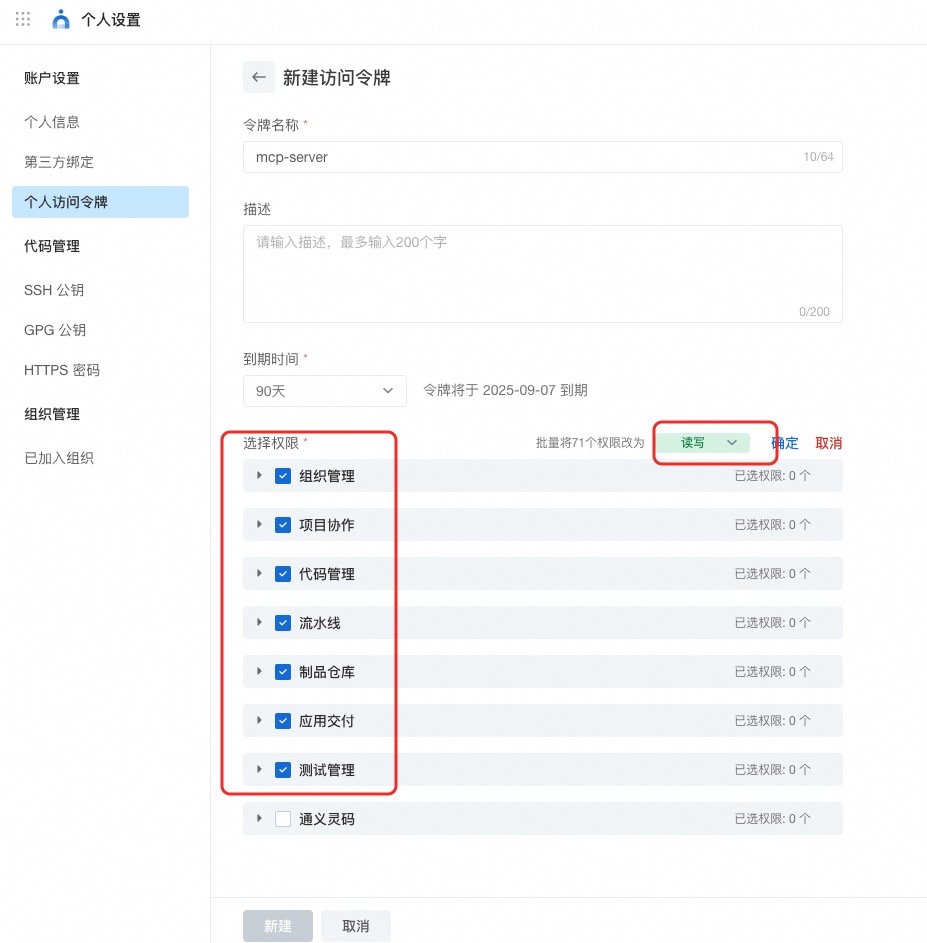
AlibabaCloud Devops Personal Access Token, click here to obtain. Grant read and write permissions to all APIs under organization management, project collaboration, code management, pipeline management, artifact repository management, application delivery and testing management.
Installing via Smithery
To install AlibabaCloud DevOps Server for Claude Desktop automatically via Smithery:
npx -y @smithery/cli install @aliyun/alibabacloud-devops-mcp-server --client claude
Install Yunxiao MCP server via MCP marketplace
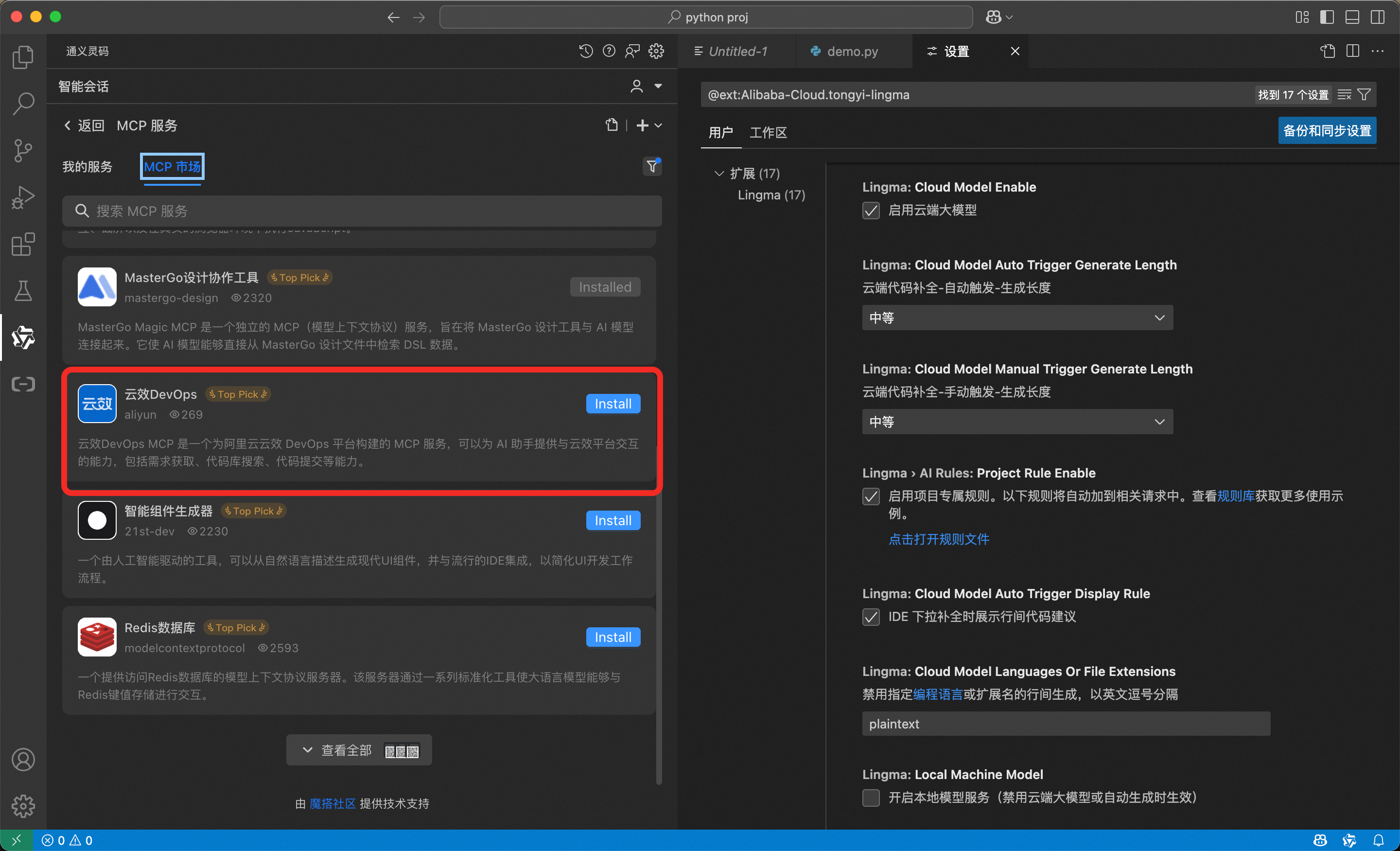
The MCP market built into Lingma (AlibabaCloud Tongyi Lingma) has already provided the AlibabaCloud Devops MCP service. To install it, simply enter the MCP market in Lingma and search for “Yunxiao DevOps”, then click install.
Run MCP Server via NPX
{
  "mcpServers": {
    "yunxiao": {
      "command": "npx",
      "args": [
        "-y",
        "alibabacloud-devops-mcp-server"
      ],
      "env": {
        "YUNXIAO_ACCESS_TOKEN": "<YOUR_TOKEN>"
      }
    }
  }
}
Run MCP Server via Docker Container
- Docker build
docker build -t alibabacloud/alibabacloud-devops-mcp-server .
- Configure MCP Server
{
  "mcpServers": {
    "yunxiao": {
      "command": "docker",
      "args": [
        "run",
        "-i",
        "--rm",
        "-e",
        "YUNXIAO_ACCESS_TOKEN",
        "alibabacloud/alibabacloud-devops-mcp-server"
      ],
      "env": {
        "YUNXIAO_ACCESS_TOKEN": "<YOUR_TOKEN>"
      }
    }
  }
}